Why I’m doing this
In the 1990s, while I should have been finishing my degree, I was
playing Unix Conquer on AIX, arguing on Usenet, lurking IRC, and
learning how systems actually worked. I didn’t get the diploma, but I got something the degree couldn’t teach: the instinct for how UNIX software is supposed to feel.
Three decades later, that instinct is what drives this rescue. I’m a
Debian contributor working toward becoming a Debian Developer: not there yet, still need sponsors for my uploads. xwpe is one of my adopted upstream projects and my path into the Debian community.
Rescuing a 1993 editor that nobody else would touch is exactly the kind of thing that happens when someone who grew up in the terminal culture of the 90s finally has the tools and the time to give back.
The Codename
The 1.6.x series is what I internally called in my head «xwpe 2026» and this is the release cycle that brought 33 years of dormant code into the present. It’s not a rewrite; it’s a restoration. We archived the scattered documentation that the early web was losing, wrote the manual the project always needed
but never had (in texinfo), and fixed every layer of the rendering and compiler integration stack so that a user in 2026 can open even a .pas (Pascal) or .f90 (Fortran) file, press F9, and navigate errors exactly like Fred Kruse intended in 1993, but this time with UTF-8 on a modern terminal.
The Fossil
xwpe is a Borland-style programming environment for UNIX, written by Fred Kruse in 1993. Dennis Payne maintained it from 2000 to 2006, then silence. All the people that contributed to it probably switched to other IDEs…and Debian kept shipping it for 20 years as a de facto orphaned package: it compiled, so nobody looked closer. Curious users filed bugs (some of them were open for 22 years)
In May 2026, GCC 15 broke the build (#1098180). Andreas Tille’s asked for help in the #debian-tiny-tasks IRC channel. That’s when I stepped in…I remembered xwpe from my university days and this could be my first intervention to rescue a package, and not only package new ones.
Digital Archaeology
Restoring xwpe feels like software archaeology, and I started to love that title when I did something similar for conquer, the classic Unix game from the 80s by Ed Barlow and Adam Bryant. After someone issued a comment on that direction in Hacker News, and myself fancying to be regarded in such manner I adopted it easily.
With software archaeology you brush away layers of dust and find code that was solid for its era: a pattern-based compiler
error parser, a manual double-buffer rendering system, overlapping popup save/restore. All designed in 1993 when ncurses was young and terminals were slow.
But 30 years of accumulated rot had set in:
- The SCREENCELL migration (v1.6.0) changed screen cells from 2 bytes to 8 bytes for UTF-8. The popup save/restore system was never fully adapted: uninitialised heap data propagated through save/restore cycles, producing CJK characters and display artefacts after closing menus. valgrind showed 15,857 uninitialised-value errors.
- The compiler error parser expected GCC’s 1990s backtick quoting
`ret') but modern GCC uses single quotes ('ret'). Thegnu_intstrpattern hadn’t been updated in decades. Error navigation (Alt-T/Alt-V) was silently broken. We updated it to the standardfile:line:column:format that GCC has used since 4.8 (2013). print_to_end_of_bufferstopped at the first blank line with abreak. This meant any compiler that emits blank lines between errors (gfortran, clang with caret diagnostics) would only show the first error in the Messages window. A one-line bug with 20+ years of age.- Default compiler names:
f77for Fortran,pcfor Pascal. Nobody had updated them since the 1990s. We updated togfortran(with .f90/.f95/.f03/.f08),fpc(with .pas/.pp and a dedicated${FILE}(${LINE},${COLUMN})*pattern), and addedjavacas a 5th default compiler. - Hardcoded
-c -oflags:e_comp()passed gcc-specific-cand-oto every compiler. Free Pascal and javac choked on-c. We made the flags conditional on compiler style: GNU compilers get them, non-GNU compilers don’t. - Compiler exit code ignored:
ret = 0was hardcoded afterwait()since the Payne era. xwpe never knew when compilation failed. Fixed withWIFEXITED/WEXITSTATUS.
We tested every compiler interactively: write a program with
deliberate errors in two separate functions, press F9, verify errors
appear in Messages, press Alt-T/Alt-V to navigate between them, verify the cursor jumps to the right line and column. gcc, g++, gfortran, fpc, and javac all passed. Kruse’s 1993 pattern-matching engine (${FILE}, ${LINE}, ${COLUMN}, wildcards) handled them all and we just had to update the default patterns and teach e_comp() that not every compiler is gcc.
Each fix reveals the next layer. Fix the SCREENCELL buffer, and you can finally see compiler errors. Fix the error display, and you discover error navigation is broken. Fix the pattern, and you find the output buffer was being truncated. Fix the truncation, and you discover the compiler defaults are from 1993.
Waking the Debugger
The deepest layer was the debugger. xwpe talks to gdb through pipes: it forks a child, launches gdb, and communicates by writing commands and reading responses. This is the feature that made xwpe an IDE, not just an editor. And it had been dead for years.
Three bugs, stacked like geological strata:
Stratum 1: SIGCHLD cannibalism. The signal handler for child
process death used wait(), which reaps any child. When xwpe
called popen("tty") to learn its terminal name, the tiny tty
subprocess would finish, trigger SIGCHLD, and wait() would eat it.
Then pclose() called waitpid() for a process that was already
gone. Deadlock. The fix: waitpid(-1, &statloc, WNOHANG): non- blocking, reap only what’s ready.
Stratum 2: phantom compilation. When the .o file was already
up to date, xwpe skipped the compiler but still called the function
that waits for compiler output. wait() with no child process fails
instantly, and xwpe concluded that compilation had failed. The
debugger never got a chance to start.
Stratum 3: phantom linking. Same bug, one function up. The
executable was up to date, linking was skipped, but the wait-for-
linker code still ran and «failed.»
Each stratum masked the one below. You couldn’t see the SIGCHLD bug until the phantom compilations were fixed. You couldn’t see those until the SCREENCELL rendering was fixed. You couldn’t fix rendering until UTF-8 worked.
After all three fixes: Ctrl-G B sets a breakpoint. Ctrl-G R starts gdb. F8 steps through code. Variables update in the Watch window. This is when the feeling of bliss rained upon me, seeing the breakpoints and the colors of the line moving over each line.
The call stack shows the function chain. It works exactly like Borland Turbo Debugger, which is exactly what Fred Kruse was building in 1993.
The User Screen Problem
But where does printf output go? In Borland’s DOS IDE, the program had its own video page: switching was a hardware register flip, instantaneous. On UNIX terminals, Kruse used smcup/rmcup (alternate screen buffer) to switch between the editor and the program’s output.
Every F8 step: rmcup, gdb executes one line, smcup back. On a 1993 VT220 over serial, this was invisible. On a 2026 terminal emulator over SSH, it’s a distracting flicker.
XWPE 1.5 solution, was to disable the User Screen entirely under ncurses with a broken #ifndef NCURSES guard that made Ctrl-G P always return an error. Problem hidden, not solved.
Our approach: eliminate the screen switching entirely. Use a
pseudoterminal (pty) to capture program output in memory. The program writes to a pty slave (which looks like a real terminal: isatty() returns true, stdout is line-buffered). xwpe reads from the pty master into a buffer. Ctrl-G P displays the buffer. No smcup/rmcup during stepping, zero flicker.
But there’s a catch that every IDE developer hits: glibc buffers
stdout even when connected to a pty, because the pty is opened by gdb (not inherited as fd 1). The output sits in a userspace buffer inside the debugged process and never reaches the pty until the program exits or calls fflush(). The solution, shared by
gdbgui, Eclipse CDT, and VS Code cpptools:
after each step, send call (void)fflush(0) to gdb. This forces the inferior’s stdout buffer to flush, and the output reaches the pty master where xwpe can read it.
The same pattern applies to jdb (Java Debugger) integration. jdb’s
VM startup is asynchronous: you send run and the prompt returns immediately, but the breakpoint hits seconds later when the JVM finishes loading. A naive blocking read busy-loops at 40% CPU waiting for output that hasn’t arrived yet.
The solution, borrowed from JDEE (the Emacs Java IDE that solved this in the 2000s): use poll() with a timeout. Zero CPU while waiting, immediate response when data arrives, graceful error if the JVM doesn’t start. JDEE uses an accumulator pattern
to buffer partial output and scan for prompt patterns: we do the
same in C with strstr() on a growing buffer.
The lesson: the 1993 codebase doesn’t need 1993 integration patterns. poll(), ptys, fflush(0): these are the same tools that Eclipse CDT and VS Code use. The only difference is we write them in 50 lines of C instead of 5000 lines of TypeScript.
How We Debugged the Debugger
Restoring an IDE’s debugger means debugging the debugger itself. We used every technique in the book, escalating as the bugs got deeper:
Level 1: fprintf to file. The first tool. When the SCREENCELL
popup artefacts appeared, we wrote cell values to/tmp/xwpe-switch-trace.txt before and after each save/restore cycle. This revealed that malloc‘d buffers contained uninitialised heap data: the fix was calloc.
Level 2: valgrind. When fprintf wasn’t enough, valgrind showed
15,857 uninitialised-value errors from the schirm buffer system.
Every one traced back to the SCREENCELL migration that changed cells from 2 to 8 bytes without updating the allocation paths.
Level 3: gdb trace files. For the debugger communication, we
logged every command sent to gdb and every response received:TX: r > /dev/pts/5, RX: Starting program:, RX: (gdb). This revealed that the gnu_intstr pattern was frozen in the 1990s (backtick quoting), that print_to_end_of_buffer stopped at blank lines, and that WpeSignalChild was stealing child processes from pclose.
Level 4: standalone reproduction. When the pty output capture
wasn’t working, we wrote a 60-line C program that reproduced xwpe’s exact pipe+fork+pty setup. The test worked; xwpe didn’t. The difference: timing. The drain function read the pty master before gdb had delivered the data. Moving the drain to aftercall (void)fflush(0) fixed it.
Level 5: conditional compile tracing. For jdb integration, we
added #ifdef JDB_TRACE instrumentation throughout the debugger communication path. Compile with -DJDB_TRACE, run, read /tmp/xwpe-jdb-trace.txt. The trace showed every byte received from jdb, every prompt detected, every state transition. This revealed the root cause: a 30-year-old pipe file descriptor leak where the parent kept the write-end of the stdout pipe open after fork, making read() unable to detect EOF. The fix: threeclose() calls in the parent, three in the child.
Level 6: poll() with timeout. For jdb’s asynchronous VM startup,
we replaced the busy-loop read() with poll() and a 10-second
timeout. Zero CPU while waiting, immediate response when data
arrives, graceful error on timeout. This is the JDEE (Emacs)
pattern from the 2000s, implemented in C.
Each level built on the previous. You can’t use valgrind until
fprintf shows you where to look. You can’t write a standalone test
until the trace log shows you what’s different. You can’t usepoll() until you understand why read() never returns EOF.
The trace infrastructure stays in the code. Compile with-DJDB_TRACE and you get a complete protocol log. This is how
professional IDE developers debug debugger integrations: and it’s how a 1993 codebase learns to talk to a 2026 JVM, in a few hundred lines of C instead of a million lines of TypeScript.
The Essence
What surprised me most is how well the core architecture holds up. Fred Kruse designed a pattern-matching system for compiler error messages (${FILE}:${LINE}:${COLUMN}:*) that’s flexible enough to handle gcc, g++, gfortran, javac, and fpc with per-language configuration.
The double-buffer rendering system (schirm/altschirm) with manual save/restore is remarkably efficient: we evaluated migrating to ncurses panels but concluded the original design is actually better for xwpe’s use case.
Each layer we peeled back revealed the next. The bugs were never in Kruse’s logic: they were in the integration: signal handlers
interacting with pclose, terminal states drifting between ncurses and manual smcup/rmcup, error patterns frozen in 1993 while compilers evolved. The architecture was solid; it just needed someone to sit down and listen to what the code was trying to say.
The goal isn’t to rewrite xwpe. It’s to preserve the essence of
Kruse and Payne’s code while fixing what 30 years of neglect in the archives broke. A restoration, not a reconstruction, like finding an old gem of a book in a antique library.
At this point a new analogy came to my mind. I think this is not a fossil anymore or an old startship at the scrapyard…this is still old, but something starts to shine, and the lights are coming back to the bridge…the Millennium Falcon flies again.
The Debian Angle
Debian had xwpe in a drawer. It compiled, so it passed CI.
Andreas has been instrumental in facilitating the upstream handover. As Debian sponsor, he shepherded the NMU that kept xwpe in the archive while I was setting up the new upstream at Codeberg. Without that bridge, the package could have been removed from unstable before the rescue could begin.
Taking over as upstream maintainer (with Dennis Payne’s blessing) and simultaneously maintaining the Debian package closes the loop. Bugs get fixed at the source, not papered over with patches, an impossible task if you ask me. The Debian
package becomes a thin wrapper around a living upstream.
Closing the Bug List
We crawled over the xwpe mailing list from 1998–2003: 487 messages. Users reported debugger freezes, «Can’t open PIPE» errors, «Error loading program» failures. John Connor’s debugger crash (June 2000). Jan Ypma’s «process vanishes» on Debian (May 2000). Diego’s «Can’t start the debugger» on X11 (October 2000). B O’Donnell’s «trip to La-La land» (July 2001). That helped me to what I could solve next.
Twenty years later, we can trace every one of these to the bugs we fixed:
- Debugger freezes:
WpeSignalChildusedwait()which stole child processes frompclose(). The popen(«tty») call to learn the terminal name would hang forever. Fixed withwaitpid(-1, WNOHANG). - «Error loading program»:
e_compande_p_makecallede_p_exec(-1)when no recompilation was needed, causing a phantomwait()failure. The debugger concluded compilation had failed andgave up. - User Screen broken: Old xwpe’s
#ifndef NCURSESguard
unconditionally disabled Ctrl-G P when compiled with ncurses: which is always, on every Linux distribution since the late 1990s. Nobody could see program output during debugging for 20+ years. - Screen flicker on stepping: Kruse’s original design switched
between alternate and normal screen (smcup/rmcup) on every F7/F8 step. Invisible on a 1993 DOS video page flip, but a
distracting flash on modern terminals. We replaced this with a
pseudoterminal that captures output in memory: zero flicker, andCtrl-G Pdisplays it cleanly.
These weren’t obscure edge cases. They were the core debugging workflow, broken for the entire ncurses era. Every user who tried the debugger between 2000 and 2026 hit one of these walls.
Java Debugging: the jdb Integration
Adding jdb (Java Debugger) as xwpe’s 5th debugger backend exposed a 30-year-old pipe file descriptor leak that affected ALL debugger types. The parent process kept the write-end of the stdout pipe open after fork(), making read() unable to detect EOF. gdb tolerated this by accident: its session never ends unexpectedly. jdb, with its fragile JVM startup timing, crashed into it immediately.
The fix: three close() calls in the parent, three in the child.
A bug that survived 30 years because nobody added a second debugger backend that was strict enough to expose it.
We researched how other editors handle jdb: JDEE
(Emacs, ~2003) parses jdb text output with an accumulator pattern. Vim has a basic jdb wrapper.
Neovim uses nvim-dap with the java-debug DAP server. Helix, Kakoune, Micro, and Nano have no Java debugging at all, as far as I know.
xwpe could be right now the only terminal editor with Java debugging built into the binary: no plugins, no external
DAP server, no Metals or java-debug setup. Open a .java file, press F8, set a breakpoint, step through code. The debugger auto-selects jdb when it sees a .java extension. It uses poll() with a 10-second timeout to wait for the JVM to start (the
JDEE accumulator pattern, implemented in C). Program output is captured from jdb’s pipe and displayed via Ctrl-G P.
The method was tight: trace instrumentation (-DJDB_TRACE) on one side, interactive testing on the other. Run jdb, watch exactly what happens: «breakpoint doesn’t change color», «popup appears but shouldn’t», «wpe closes without asking»: and each symptom points at a specific code path. The trace file (/tmp/xwpe-jdb-trace.txt) showed every byte exchanged with jdb. Between what I saw on screen and the trace log, each bug narrowed to a single line of C.
The Millennium Falcon
xwpe is during these days the Millennium Falcon of IDEs. It may not look like much: 3000 lines of 1993 C, a TUI that draws its own borders with ACS characters, a pattern-matching engine for compiler errors that uses ${FILE}:${LINE}:${COLUMN}:* instead of regex. But it has what matters.
Fred Kruse built it in 1993, when Linux was two years old and gcc
didn’t have colour output. It was visionary: an integrated
compile-edit-debug cycle on UNIX terminals, years before Eclipse or VS Code existed. That it survived until 2006 with bugs like the
SIGCHLD handler stealing child processes and the User Screen
permanently disabled speaks to the solidity of the core design.
It does what VS Code does with a million lines of TypeScript and
an Electron runtime. It does it in 3000 lines of C, in 2MB of RAM,
over an SSH connection to a headless server, on a Raspberry Pi, in a Docker container, on a serial console. Anywhere you have a terminal and a C compiler, xwpe works.
And it speaks your language. Borland users get the F-key driven menus and the F9 compile cycle they remember. Emacs users get Ctrl-P/N/F/Bfor cursor movement, Ctrl-A/E for line start/end: all the readline keybindings they have in muscle memory. Kruse built both into the same editor in 1993, two decades before VS Code offered «Emacs Keymap» as an extension.
The mailing list went silent in 2006. The last user report was about
a debugger crash. We now know exactly why: wait() instead ofwaitpid(), in a signal handler written in the 1990s, triggered
every time popen("tty") finished before pclose() could reap it. A one-line fix for 20 years of silence.
The Bug Trail: 487 Messages, 50 Issues, One Trace
The hardest bugs to find are the ones nobody can reproduce reliably. The Redo crash: press Ctrl-R after undoing a search-and-replace and watch xwpe die with SIGSEGV. This was reported in 2017 as issue 77 on Alessandro Magnasco’s GitHub fork. Guus Bonnema tried to investigate it. Nobody fixed it. The issue sat open for 9 years.
We found it by following a trail across 30 years of scattered sources:
- 487 mailing list messages (1998-2003) from Payne’s
identicalsoftware.com archive, preserved in our xwpe-archive repo - 50 open issues from Magnasco’s GitHub fork, triaged one by one against our codebase
- Miroslav Janiš’s Czech review (1998), which documented the
-cflag bug we fixed 28 years later - Guus Bonnema’s experimental branch, which identified the
search/replace undo problems but couldn’t pinpoint the cause - The LUG-S debugger course (2001), with GIF screenshots
transcribed for our manual - 9 Debian BTS reports spanning 2002-2025
The Redo crash turned out to be a single uninitialized field.
To understand it, think of xwpe as having two notebooks. The «editor notebook» is where the Replace command writes down «I just replaced 5 characters». The «undo notebook» is where Undo reads «how many characters were replaced?» to know how to reverse the operation.
The problem: Kruse wrote the answer in one notebook (the editor’s global search state, f->ed->fd.rn) but read it from a different notebook (the window’s local copy, b->f->fd.rn). The local copy was never filled in. It contained whatever garbage happened to be in memory when the window was created: in our trace, 189 instead of 5.
So when Redo tried to «redo the replacement», it thought it needed to save 189 characters from a line that only had 5. It wrote past the end of its buffer, corrupted the memory allocator’s internal bookkeeping, and crashed inside malloc() itself: not even in xwpe’s own code.
The stack trace showed unlink_chunk deep inside libc, which is
nearly impossible to diagnose without knowing what led to the
corruption.
We found it by adding a trace log that printed the undo entry’s fields before each operation. The log showed a=(5,189): five characters saved, but 189 recorded as the replacement length. Should have been a=(5,5). The 189 was the smoking gun.
The fix: one line. b->f->fd.rn = fd->rn; copy the answer from the right notebook to the one that Undo actually reads. A bug that existed since 1993, reported in 2017, diagnosed in 2026.
No single source would have led us there. The mailing list told us
which features were fragile. The GitHub issues told us which scenarios crashed. The code archaeology told us which fields were out of sync.
Together, they drew a map to a one-line fix for a 33-year-old bug.
The Mouse: Three Decades, Three Backends
When we opened we_mouse.c, we found 1189 lines of mouse UI logic: menus, scrollbars, window resize by dragging corners, text selection, drag-and-drop between file manager windows. Every interaction you’d expect from a Borland IDE. All of it written by Fred Kruse in 1993.
And at the bottom of we_term.c, the terminal mouse backend:
int fk_t_mouse(g)
     int *g;
{
   return(0);
}
Four lines. A stub. A placeholder that said: «I don’t know how mouse will work on terminals yet, but when someone figures it out, plug it in here.»
The plug was fk_mouse: a function pointer. X11 mode set it tofk_x_mouse (reading Xlib ButtonPress events). Terminal mode set it to this stub. All 1189 lines of we_mouse.c never knew or cared which backend was active. They called fk_mouse(g) through the pointer and got coordinates back. Textbook Unix polymorphism in C.
In 1998, Sebastiano Suraci at the University of Catania plugged in
GPM: the General Purpose Mouse daemon for the Linux console. His we_gpm.c called Gpm_Open(), installed a handler callback, and set fk_mouse = WpeGpmMouse. The 1189 lines of mouse UI worked instantly. Kruse’s architecture held.
For 26 years.
Then ncurses changed. Sometime around ncurses 5.x-6.x, the library added its own internal GPM integration. When you call mousemask(), ncurses now opens its own GPM connection, reads events from the same socket, and delivers them as KEY_MOUSE. Two consumers fighting over the same gpm_fd. Events went to one handler or the other unpredictably. Coordinates disagreed: Suraci set gpm_zerobased=1
(0-based), ncurses expected 1-based and subtracted 1 internally.
Clicks became erratic. Sometimes the menu responded, sometimes it selected text, sometimes nothing happened.
The fix was to let go of Suraci’s code. Not because it was wrong: it was perfect for 1998. But ncurses 6.x already does what Suraci did manually. We removed the direct Gpm_Open(), let mousemask() handle GPM transparently, and plugged ncurses mouse into Kruse’s fk_mouse stub. The same four-line function that was empty in 1993 now handles mouse clicks in xterm, gnome-terminal, kitty, tmux, and the Linux console with GPM: all through the same KEY_MOUSE + getmouse() path.
Three backends across three decades, and we_mouse.c never changed.
That’s engineering.
The Drag: Teaching a 1993 Editor to Follow Your Hand
Click works. Drag is another world.
And not only for the mouse, this one took me days.
When we plugged ncurses mouse into Kruse’s fk_mouse stub, clicks worked instantly: every menu, scrollbar, and window switch lit up through the 1189 lines of we_mouse.c without a single change. Three backends, three decades, Kruse’s architecture held. We said so in the previous chapter.
But try to drag a window’s title bar, and nothing happens. The window doesn’t move. Your hand goes across the trackpad and the cursor just sits there, blinking. Because ncurses mode 1000: the default: only reports press and release. The hundred mouse positions your hand traces between them? Invisible. The terminal doesn’t send them. The editor never sees them.
Enter mode 1002.
The Protocol Nobody Documents
xterm mouse mode 1002 (\033[?1002h) is the drag tracking protocol.
While a button is held down, the terminal sends a REPORT_MOUSE_POSITION event for every cell the cursor crosses. This is how Midnight Commander does panel resize. This is how tmux does pane drag. This is how vim does visual selection across lines. Not mode 1000 (clicks only), not mode 1003 (all motion, even without buttons: floods the input), but 1002: motion while button held. Exactly what window drag needs.
We enabled it at terminal init. Two escape sequences:\033[?1002h\033[?1006h. The second enables SGR extended coordinates: without it, terminals wider than 223 columns encode garbage because the X10 coordinate byte overflows. Both disabled cleanly at exit.
And suddenly, fk_t_mouse was receiving a continuous stream of
coordinates. Kruse’s drag loops in we_mouse.c: written in 1993 for X11’s MotionNotify events: started moving windows in ncurses!. The title bar followed the mouse. The corner resize handles worked. Three decades of dormant drag code, waking up because the right two bytes were sent to the terminal at init time.
The Popup Trap
It worked perfectly. Until F9.
Press F9 to compile. The «Compiling…» popup appears, the compiler runs, results go to Messages. Close Messages. Now try to drag a window.
The title bar grabs: and never lets go. The window follows your mouse forever, even after you release the button. The UI is stuck in an infinite drag loop.
The root cause took three failed workarounds before we stopped patching and started engineering.
Here’s what happens. The user is happily clicking around: e_mouse.k says «button 1 pressed» or «button 1 released» and everything works. Then the F9 popup opens. The popup has its own event loop. Inside that loop, ncurses delivers a PRESSED event (the click that activated something inside the popup) and its corresponding RELEASED event. The popup’s event loop consumes both. It exits.
Now fk_t_mouse runs in the main event loop. It reads e_mouse.k, which still says «pressed» from the LAST event the main loop saw: before the popup stole the release. The drag loop starts. But the physical button is released. No RELEASED event will ever arrive (the popup already ate it). The drag loop waits forever.
We studied how other TUI frameworks handle this:
- Midnight Commander: uses per-widget mouse capture flags.
The active widget claims the mouse, and when it releases, the flag clears. But MC doesn’t have xwpe’s stacking window manager with arbitrary popups. - Turbo Vision (Borland’s own C++ TUI framework from 1990):
uses an exclusive drag loop withGetMouseEventin a tightwhile(button_held)loop. The loop owns the mouse until release. Popups can’t interrupt because the drag loop doesn’t yield to the event dispatcher. - ncurses itself: provides no popup-aware mouse state. It
reports events. What you do with them is your problem.
Neither MC’s per-widget capture nor Turbo Vision’s exclusive loop
fit xwpe’s architecture. Kruse’s design dispatches mouse events
through a function pointer (fk_mouse), and the drag code inwe_mouse.c assumes it gets a clean press-drag-release sequence. Popups break that assumption.
g_mouse_buttons: One Bitmask to Rule Them
The solution: separate physical button state from event dispatch.
int g_mouse_buttons = 0;One global integer. Bit 0 is button 1. Updated in exactly two places: e_t_getch (the keyboard reader) sets the bit on PRESSED, clears it on RELEASED. fk_t_mouse (the mouse dispatcher) reads g_mouse_buttons to decide if a drag is happening, instead of relying on e_mouse.k.
The key insight: e_t_getch always sees every mouse event, even inside popup event loops, because popups call e_t_getch too. So g_mouse_buttons always reflects the true physical state. When the popup’s event loop processes a RELEASED event, g_mouse_buttons lears the bit. When the popup exits and the main loop resumes, fk_t_mouse reads g_mouse_buttons = 0 and knows: no drag. No
stuck mouse. No infinite loop.
But that’s only half the fix.
e_mouse_flush: Draining the Dead
After a popup closes, the ncurses event queue may still contain stale mouse events: phantom RELEASEDs from clicks inside the popup, or motion events from the user’s hand moving while the popup was open. If these reach fk_t_mouse before a fresh click, they confuse the state machine.
Worse: ncurses sometimes silently disables mode 1002 during popup event processing. The escape sequence handler gets confused by the popup’s output, and drag tracking stops. The terminal stops sending motion events. The next drag attempt fails silently: you click the title bar, hold the button, move, and nothing happens. No error, no diagnostic, just a dead mouse.
e_mouse_flush() fixes both problems:
- Drain: loop
getmouse()until it returnsERR: empty the
queue of stale events. - Re-enable: re-send
\033[?1002h\033[?1006h: force mode 1002 back on, regardless of what ncurses did internally. - Reset:
g_mouse_buttons = 0: start from a known state.
Called at the exit of e_mess_win (the popup message handler) and e_opt_kst (the options/dialog handler). Every code path that opens a popup and processes its own mouse events must call e_mouse_flush on exit.
The Test
Three windows open. Two source files and Messages. Drag each window by its title bar: smooth, continuous, follows the hand. Press F9 : compiler runs, Messages appears. Drag Messages down, drag a source window up, drag the third window. Release. Click somewhere else.
Everything works.
The mouse log shows the proof: gb=1 (g_mouse_buttons bit 0 set) throughout every drag, bstate=0x10000000 (REPORT_MOUSE_POSITION) for every motion event, bstate=0x1 (BUTTON1_RELEASED) at the end of every drag. No orphaned presses, no stuck state, no mode 1002 dropouts.
Three hundred lines of mouse events, and every single one falls
into the pattern: press, continuous motion, release. Press, motion, release. The state machine never breaks. The bitmask never lies.
Kruse’s we_mouse.c: 1189 lines of drag handlers, resize
handlers, menu handlers, scroll handlers: never knew any of this
happened. It called fk_mouse(g), got clean coordinates back, and moved windows. The same function pointer, the same abstraction, the same architecture. 1993 to 2026.
The Relayout: Windows That Remember Where They Belong
Drag is pointless if resize destroys your layout.
When the terminal resizes (SIGWINCH in ncurses, ConfigureNotify in X11), the screen buffer is reallocated and all windows must adapt.
The naive approach: clamp coordinates to the new bounds. It works for shrinking but fails for growing: windows that were pushed to the edge during a shrink never reclaim their space when the terminal grows back.
The deeper problem: ratio drift. If you have a window at row 15 of
30, and the terminal shrinks to 20 rows, integer truncation puts it
at row 10. Grow back to 30: truncation puts it at row 15. Looks
fine. But do it 50 times: shrink by 1, grow by 1, shrink by 1,
grow by 1: and the accumulated truncation error slowly walks the
window toward the top of the screen.
We designed an edge-attachment algorithm:
For each window coordinate, check if it was touching a screen edge before the resize. A window whose bottom was at MAXSLNS - 2 (the last usable row) is «bottom-attached»: its bottom follows the screen edge. A window whose top is at row 1 is «top-attached»: it stays at row 1. Interior coordinates: not touching any edge : scale proportionally with round-to-nearest:
int e_scale_y(int y, int old_h, int new_h)
{
    return (y * new_h + old_h / 2) / old_h;
}
The old_h / 2 term is the round-to-nearest correction. Without it, 15 * 20 / 30 = 10, then 10 * 30 / 20 = 15: looks reversible.
But 7 * 20 / 30 = 4 (truncated from 4.67), then 4 * 30 / 20 = 6: you lost a row. Accumulated over many cycles, the window collapses. With rounding: 7 * 20 + 15 = 155, / 30 = 5 (rounded from 4.67), then 5 * 30 + 10 = 160, / 20 = 8: overcorrects by one, but the error doesn’t accumulate. The window oscillates by one row instead of drifting monotonically.
Three windows, Messages at the bottom, terminal shrinking and
growing wildly: every window stays where it should. The editor
fills the top two-thirds, Messages fills the bottom third, and the
proportions hold.
Bounds-Safe Rendering
One more wall between drag and crash: SCHIRM_INBOUNDS.
When a dialog is wider than the terminal (common during extreme
shrink), the rendering loop tries to write cells past the schirm
allocation. In 1993, terminals didn’t resize. In 2026, every drag
of a tiling WM border triggers a resize. Writing past the allocation
corrupts the heap: random crashes seconds or minutes later.
#define SCHIRM_INBOUNDS(y, x) \
    ((y) >= 0 && (y) < MAXSLNS && (x) >= 0 && (x) < MAXSCOL)
Every schirm access macro: e_pr_char, e_gt_char, e_gt_col, e_pt_col, e_gt_flags, e_pt_flags: checks bounds before
touching memory. Out-of-bounds writes are silently dropped. The
dialog renders the part that fits; the part beyond the terminal edge is invisible. Grow the terminal back, and the dialog reappears
complete. No crash, no corruption, no state to recover.
This is the same pattern that modern terminal emulators use (st,
alacritty, foot): the model can be larger than the view, and the
view clips silently. The renderer never writes outside the view.
What Kruse Knew
Kruse wrote fk_t_mouse as a four-line stub that returned zero.
He wrote fk_mouse as a function pointer. He wrote 1189 lines of
drag logic in we_mouse.c that never mentioned X11 or ncurses or
GPM.
In 1993, the only mouse backend that worked was X11 (fk_x_mouse). Terminal mice didn’t exist yet: GPM was experimental, xterm mouse support was rudimentary. But Kruse designed the separation anyway.
He couldn’t have known that mode 1002 would exist, that ncurses
would add mousemask(), that GPM would be absorbed into ncurses, that popups would desynchronise button state. But he designed an architecture that survived all of it.
We added g_mouse_buttons, e_mouse_flush, e_relayout_windows, and SCHIRM_INBOUNDS. Four mechanisms, each solving a problem that didn’t exist in 1993. And we_mouse.c: the file that actually moves windows, resizes them, selects text, scrolls content, didn’t change at all.
That’s not luck. That’s Kruse design.
The X11 Ghost Problem
Kruse’s X11 rendering used raw Xlib: XDrawImageString for text,XDrawLine for window borders, manual pixel management for everything.
An array called extbyte tracked which cells had border line segments.
When a popup or File Manager was closed, the border pixels persisted on the X11 window: ghost images that wouldn’t go away.
The bug was architectural: extbyte is a flat array with no concept of window stacking. A window behind the editor could have its border flags set, and e_x_refresh would dutifully draw those XDrawLine segments on top of the editor’s content. The fix that finally worked: clear extbyte for the interior of every window in the stack on each refresh. Pragmatic, not elegant: but it catches every code path.
Dennis Payne saw this coming. In his TODO file he wrote: «Use
higher-level APIs instead of xlib and the lowest curses interface.»
He knew that pixel-level rendering was a maintenance trap.
The Output Problem: From xterm to Messages
In Kruse’s original design, the debugged program’s output went to the terminal (via smcup/rmcup screen switching). In X11 mode, Payne added an xterm window: a shell script that launched the debugger inside an xterm via named pipes. The xterm stole keyboard focus, closed before you could read the output, and left xwpe in an unresponsive state if anything went wrong.
We unified program output for both terminal and X11 mode into the Messages buffer: the same window used for compiler errors (F9). Now Ctrl-G P (User Screen) appends program output to Messages with full scroll. Ctrl-F9 Run for interpreted languages (Python, LaTeX) captures output via popen() directly into Messages, bypassing xterm entirely.
No context switch, no focus steal, no window to close.
The same approach that Borland would have used if their IDE had run on
UNIX: one output pane, multiple uses, always accessible.
Following st: the Xft Migration
The final piece of the X11 puzzle was fonts. Kruse usedXDrawImageString, which is Latin-1 only. No accented characters, no Cyrillic, no emoji. In terminal mode, ncursesw handles everything:
the terminal emulator’s font stack does the work. In X11 mode, xwpe IS the renderer.
We first tried a hybrid approach: Xft for some characters,
XDrawImageString for others. It failed spectacularly. The two rendering systems use different metrics, different GC state, different background fill semantics. Mixing them produced white backgrounds, invisible text, and border artefacts. Every partial fix broke something else.
I stopped patching and made the call: implement Payne’s recommendation completely: go all-Xft: instead of monkeypatching the hybrid. It was faster than chasing one more partial fix, and it was the right call.
We studied the st (suckless terminal) source
and read how it renders text. st uses Xft for 100% of its rendering: no XDrawImageString anywhere. The patterns we adopted:
- XftFont via fontconfig (
monospace:size=10): any TrueType font - XftDrawRect for background fill (one call per cell)
- XftDrawStringUtf8 for text (with per-character font fallback)
- Font cache (
frc[]array): fontconfig lookup once per codepoint, cached forever. Same pattern as st, same struct layout. - XftDraw on Pixmap: all rendering goes to an off-screen Pixmap,
XCopyAreato the window at the end. Zero flicker on resize. - FC_COLOR for emoji fallback: fontconfig prefers Noto Color Emoji for codepoints above U+2600
The migration touched we_xterm.c (rendering), WeXterm.c (font init), WeXterm.h (Xft fields), configure.ac (Xft detection), and Makefile.am (link flags). The original XDrawImageString path is preserved inside #else for systems without Xft.
With libXft 2.3.5+ (shipped in Debian since 2022), BGRA color emoji rendering works natively. The same XftDrawStringUtf8 call that renders hello also renders hello 🎉 with a full-color emoji glyph from Noto Color Emoji.
The Wide Character Problem
Emoji and CJK characters take two columns on screen (wcwidth() = 2).
But xwpe’s SCREENCELL buffer stores one character per cell. When an emoji occupies cells 5 and 6, cell 6 needs to know it’s the
«continuation» of cell 5: otherwise the cursor treats it as an
independent character, delete removes only half, and the rendering draws a background rectangle over the second half.
We studied how st, vim, alacritty, and libvterm handle this. Every
implementation converges on the same pattern: flag bits on the cell.
We added a flags field to SCREENCELL with two values:
CELL_WIDEon the first cell (the emoji itself)CELL_WIDE_SPACERon the second cell (the continuation)
The rendering code skips spacer cells. The cursor jumps over them.
Delete removes both cells. Mouse clicks on a spacer map to the wide char. The same invariant maintenance pattern from st: every write operation checks both flags and clears the partner cell.
This is a transversal change: it touches unixmakr.h (the struct), we_wind.c and we_progn.c (rendering), we_edit.c (cursor and delete), and we_mouse.c (click mapping). But the pattern is clean and well-tested across the industry.
Python, LaTeX, and the Scripted Language Pattern
The 1.6.2 cycle added full support for interpreted languages:
- Python: 35-keyword syntax highlighting, F9 via
python3 -m py_compile,
pdb as 6th debugger backend (breakpoints, F8 stepping, auto-skip of
internal Python frames, output capture). - LaTeX: 31-keyword syntax highlighting, F9 via
pdflatex -interaction=nonstopmode -file-line-error, error navigation. - Ctrl-F9 Run detects interpreted languages (
comp_sw & 1) and runs the interpreter directly viapopen(), capturing output to
Messages. No xterm, no subprocess management, no focus stealing.
The pattern is extensible. Adding a new compiler takes ~10 lines inwe_prog.c (compiler name, flags, error pattern, file extensions). If the compiler emits file:line:column: format (the GNU standard since 2013), it works with zero configuration.
In v1.6.3 we added Perl (perl -c, 46-keyword syntax highlighting, Ctrl-F9 run) and COBOL (cobc, 50-keyword syntax highlighting, GNU mode), bringing the total to 9 default compilers.
Status
- v1.5.31: Rescue release (Payne baseline + cherry-picks + Debian patches)
- v1.6.0: UTF-8/SCREENCELL migration, terminal resize, modern keys
- v1.6.1: Modern autotools (configure.ac + Makefile.am)
- v1.6.2: The release that brought xwpe from 1993 to 2026:
- v1.6.3 (released 2026-06, in Debian unstable): the usability release.
The fossil lives. It compiles your code, navigates your errors, steps
through your functions, shows you the output: with anti-aliased
TrueType fonts, color emoji, and UTF-8 from terminal to X11. And now it feels right under your fingers: Tab cycles through dialogs, colors are legible, Shift-Tab goes backwards, errors follow the cursor.
Fred Kruse built the architecture in 1993. Dennis Payne maintained it for a decade. We brought it to 2026, following st’s rendering patterns and the industry’s wide-character conventions. The code went from bitmap fonts and Latin-1 to fontconfig and Noto Color Emoji: and the core
design held. Every function pointer, every double buffer, every pattern matcher that Kruse wrote still does exactly what it was designed to do.
We just gave it better tools to work with.
xwpe 1.6.3 is at the date of the release of this post in Debian unstable. The same binary is verified end to end on
thanks to a new addition: 134 console tests and 58 headless-X11 tests pass against the installed package, so «it builds» is now «it works.»
And the part that still gets me: Fred Kruse, who wrote that first version in 1993, has been in touch. He wants to try it. Thirty-three years after he built it, and two decades after the last release, the original author wants to watch his editor run again. Dennis Payne gave his blessing to the handover; Kruse gave the rescue its meaning.
When v1.7 lands with DAP (Debug Adapter Protocol) support: Rust, Go, JavaScript and C# debugging from a 1993 TUI: that’s when the Millennium Falcon gets its public debut. For now, it flies again.
Before and after:
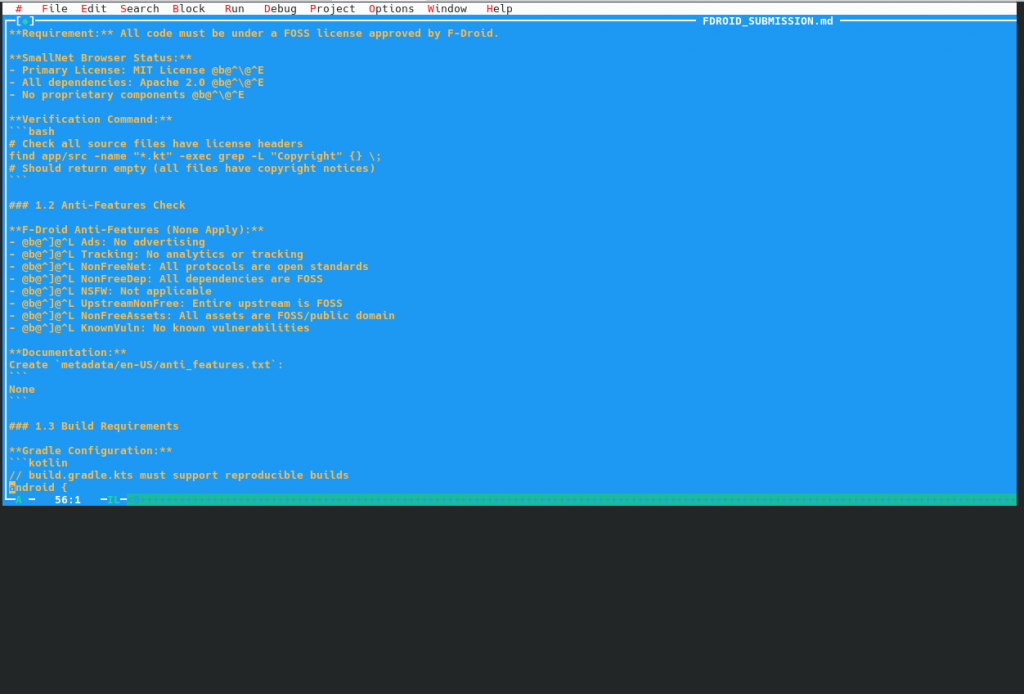
Xwpe 1.5.30: No UTF-8 support. Old scrollbars style
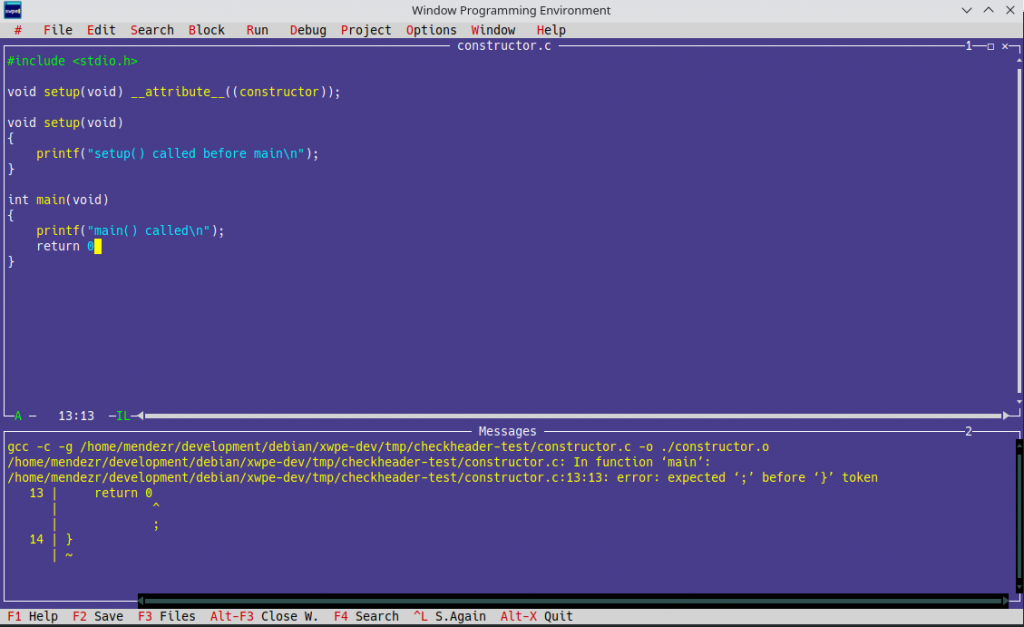
XWPE 1.6.3, showing Ctrl-F9 output in the Messages Window
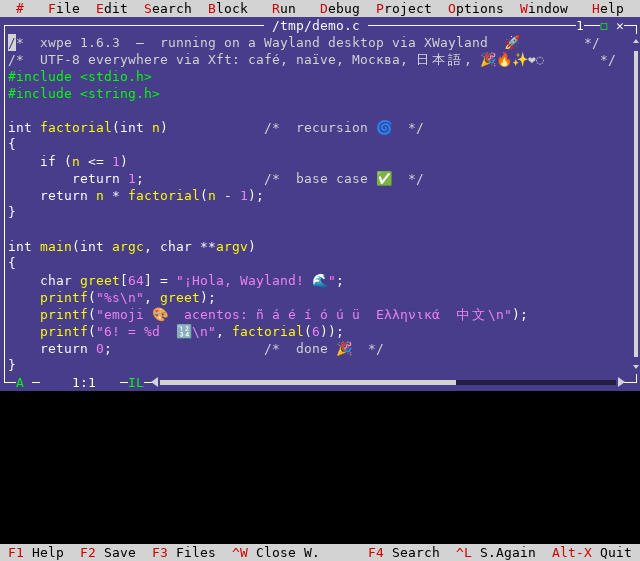
Testing XWPE in Wayland with UTF-8 support, opening a file with «emojis». «The widecell problem»

Deja una respuesta