Tengo un Windows 10 en la partición de un portátil antiguo.
El requisito para ejecutar una distribución embebida de GNU/Linux es: Instalar el Subsistema de Windows para Linux
Te recomiendo seguir este artículo donde explica los prerequisitos.
https://docs.microsoft.com/es-es/windows/wsl/install-win10
Uno de ellos es pertenecer al Insider Program de Windows. Si no puedes hacerlo desde la configuración, puede que lo más rápido sea bajarte la ISO, montarla, y ejecutar el Setup:
https://www.microsoft.com/en-us/software-download/windowsinsiderpreviewadvanced
Caveat: He leído que esto activa la telemetría de información hacia Microsoft.
Autor: vejeta
-
Instalar GNU/Linux en un Windows 10
-
Conectandose al IRC con GNU Emacs y ERC.
⚠️ Actualización Octubre 2025:
Freenode dejó de existir en 2021 tras un hostile takeover de la red (anuncio del staff original). La comunidad de software libre migró masivamente a Libera.Chat, una nueva red fundada por el staff original de Freenode. Este artículo ha sido actualizado para reflejar la configuración moderna.Redes IRC actuales para FLOSS:
- Libera.Chat – Reemplazo oficial de Freenode para proyectos de software libre (anuncio oficial)
- OFTC – Red oficial de Debian y otros proyectos
Referencias sobre la migración:
GNU Emacs viene de base con el paquete ERC para poder conectarnos al IRC.
En este artículo publicamos como automatizar el proceso de conectarnos a las redes de Freenode Libera.Chat y OFTC, autenticación de nuestro nick con NickServ, y entrar en los canales que definamos.
A su vez, para más seguridad, las claves van a ser encriptadas con GPG.
Se asume que previamente:
- Se ha configurado GPG en el sistema
- Los usuarios han sido registrados en los respectivos NickServ de cada servidor de IRC
1. Crear el fichero .authinfo
machine irc.freenode.net login **** password ****

machine irc.libera.chat login **** password ****
machine irc.oftc.net login **** password ****
Nota: omitimos los valores reales del nick y el password.
2. Encriptar el fichero .authinfo
Desde Emacs:
M-x epa-encrypt-fileSeleccionamos
.authinfoEsto creará el fichero
.authinfo.gpgNota 1: El módulo que hace posible esto se llama EasyPG.
Nota 2: A partir de ahora, podemos borrar.authinfo. Cada vez que Emacs abra el fichero.authinfo.gpglo desencriptará automáticamente para poder editarlo y lo encriptará al guardar.3. Automatizar la conexión a los servidores de ERC
📁 ¿Dónde poner esta configuración?Doom Emacs:
Añade el código en~/.doom.d/config.el
Después ejecuta:doom syncy reinicia EmacsSpacemacs:
Añade el código en~/.spacemacsdentro de la funcióndotspacemacs/user-configEmacs Vanilla (sin distribución):
Añade el código en~/.emacso~/.emacs.d/init.eluse-package (recomendado para configuración modular):
Crea un archivo separado como~/.emacs.d/lisp/setup-erc.ely cárgalo desde tu init.el con:
(load "~/.emacs.d/lisp/setup-erc.el")Configuración Básica
;; Lectura de las claves encriptadas en .authinfo.gpg
(setq auth-sources
      '((:source "~/.authinfo.gpg")))

(setq erc-autojoin-timing 'ident)
(setq erc-prompt-for-nickserv-password nil)
Entrada automática a los canales de cada servidor IRC
(setq erc-autojoin-channels-alist
      '(("freenode.net" "#emacs-es" "#debian" "#nethack"
         "libera.chat" "#emacs-es" "#debian" "#nethack" "#emacs" "#guix" "#lisp")
        ("oftc.net" "#debian-next" "#oftc"
                    "#debian-mentors"      ; Para aspirantes Debian Maintainer
                    "#debian-devel"        ; Desarrollo general Debian
                    "#debian-multimedia"   ; Paquetes multimedia
                    "#debian-qa"           ; Quality Assurance
                    "#debian-es")))        ; Comunidad Debian española
Identificación con cada servidor
Cambiar el valor del nick apropiadamente en cada caso.
(erc-tls :server "irc.freenode.net" :port 6697 :nick "****")
(erc-tls :server "irc.libera.chat" :port 6697 :nick "****")
(erc-tls :server "irc.oftc.net" :port 6697 :nick "****")
4. Usar certificado personal con OFTC (alternativa a NickServ)
📁 Ubicación del certificado:
Los archivoskeyfileycertfilegeneralmente se guardan en:
~/.ssl/oftc/o~/.config/ssl/oftc/Reemplaza
/path/to/your/keyfiley/path/to/your/certfilecon las rutas reales, por ejemplo:
("/home/tuusuario/.ssl/oftc/nick.key" "/home/tuusuario/.ssl/oftc/nick.crt")Como alternativa a la validación por clave o password, existe la posibilidad de usar certificados para conectarse al servidor.
Para usar un certificado con OFTC: https://www.oftc.net/NickServ/CertFP/
Las instrucciones para versiones Emacs 27 o 28 están aquí: https://www.emacswiki.org/emacs/ErcSSL
Creamos el certificado tal como se indica en la página de oftc.net y añadimos esto a nuestros ficheros init de emacs:
(with-eval-after-load 'erc

  ;; erc hack for gnutls for client cert.
  (defvar *uconf/erc-certs* nil
    "erc client certs used by gnutls package for :keylist.")

  ;; copied from the gnutls lib but set :keylist to client certs.
  ;; this function is called from `open-network-stream' with :type tls.
  (defun uconf/open-gnutls-stream (name buffer host service &optional nowait)
    (let ((process (open-network-stream
                    name buffer host service
                    :nowait nowait
                    :tls-parameters
                    (and nowait
                         (cons 'gnutls-x509pki
                               (gnutls-boot-parameters
                                :type 'gnutls-x509pki
                                :keylist *uconf/erc-certs* ;;added parameter to pass the cert.
                                :hostname (puny-encode-domain host)))))))
      (if nowait
          process
        (gnutls-negotiate :process process
                          :type 'gnutls-x509pki
                          :keylist *uconf/erc-certs* ;;added parameter to pass the cert.
                          :hostname (puny-encode-domain host)))))

  ;; only set the global variable when used from `erc-tls'.
  (defun uconf/erc-open-tls-stream (name buffer host port)
    (unwind-protect
        (progn
          (setq *uconf/erc-certs*
                '(("/path/to/your/keyfile" "/path/to/your/certfile")))
          (open-network-stream name buffer host port
                               :nowait t
                               :type 'tls))
      (setq *uconf/erc-certs* nil)))

  (advice-add 'open-gnutls-stream :override #'uconf/open-gnutls-stream)
  (advice-add 'erc-open-tls-stream :override #'uconf/erc-open-tls-stream)
  )
Configuración Avanzada (Opcional)
💡 Nota sobre configuración modular:Para Doom Emacs:
Toda esta configuración avanzada va en~/.doom.d/config.elPara organización limpia (cualquier Emacs):
Puedes crear un archivo separado~/.emacs.d/erc-config.elcon toda la configuración de ERC y cargarlo desde tu init principal:;; En tu ~/.emacs o ~/.doom.d/config.el (when (file-exists-p "~/.emacs.d/erc-config.el") (load "~/.emacs.d/erc-config.el"))Esto mantiene tu configuración modular y fácil de mantener.
Logging y Tracking Mejorado
;; Guardar logs de conversaciones
(setq erc-log-channels-directory "~/.erc/logs/"
      erc-save-buffer-on-part t
      erc-save-queries-on-quit t
      erc-log-write-after-send t
      erc-log-write-after-insert t)

;; Tracking mejorado - ignora mensajes de sistema
(setq erc-track-exclude-types '("JOIN" "NICK" "PART" "QUIT" "MODE"
                                 "324" "329" "332" "333" "353" "477")
      erc-track-enable-keybindings t
      erc-track-visibility nil)

;; Timestamps visibles
(setq erc-timestamp-format "[%H:%M]"
      erc-insert-timestamp-function 'erc-insert-timestamp-left)
Función de Conexión Rápida
(defun my/erc-connect ()
  "Connect to IRC servers."
  (interactive)
  ;; Libera.Chat (reemplaza Freenode)
  (erc-tls :server "irc.libera.chat" :port 6697 :nick "tu-nick")

  ;; OFTC (para Debian)
  (erc-tls :server "irc.oftc.net" :port 6697 :nick "tu-nick"))

;; Keybinding para conexión rápida
(global-set-key (kbd "C-c e c") 'my/erc-connect)
Canales Recomendados para Debian Maintainers
En OFTC (irc.oftc.net):
- #debian-mentors – Aspirantes a Debian Developer/Maintainer
- #debian-devel – Desarrollo general de Debian
- #debian-multimedia – Paquetes multimedia (relevante para Stremio, VLC, etc)
- #debian-qa – Quality Assurance y testing
- #debian-es – Comunidad Debian hispanohablante
- #debian-next – Testing y Sid
En Libera.Chat (irc.libera.chat):
- #emacs – Comunidad Emacs general
- #emacs-es – Comunidad Emacs hispanohablante
- #lisp – Common Lisp
- #guix – GNU Guix
Referencias y Recursos
-
Configurando Mutt con Gmail
Recientemente, me encontré en la tesitura de enviar un parche al kernel linux, concretamente, una corrección menor de documentación. Seguí la sugerencia de este tutorial https://opensource.com/article/18/8/first-linux-kernel-patch de enviar el parche a través de Mutt
Para configurar mutt, creé el el fichero .muttrc en la carpeta $HOME de mi usuario con el siguiente contenido, sustituyendo __your_user__ por mi usuario y __your_app_password por mi clave de aplicación (lo explicaré más adelante).# ================ IMAP ==================== set imap_user = '__youruser__@gmail.com' set imap_pass = '__your_app_password__' set spoolfile = imaps://imap.gmail.com/INBOX set folder = "imaps://imap.gmail.com:993" set record="imaps://imap.gmail.com/[Gmail]/Sent Mail" set postponed="imaps://imap.gmail.com/[Gmail]/Drafts" set mbox="imaps://imap.gmail.com/[Gmail]/All Mail" # ================ SMTP ==================== set smtp_url = "smtp://__youruser__@gmail.com@smtp.gmail.com:587/" set smtp_pass = $imap_pass set ssl_starttls = yes # activate TLS if available set ssl_force_tls = yes # Require encrypted connection # ================ Composition ==================== set editor = `echo \$EDITOR` set edit_headers = yes # See the headers when editing set charset = UTF-8 # value of $LANG; also fallback for send_charset # Sender, email address, and sign-off line must match unset use_domain # because joe@localhost is just embarrassing set realname = "John Smith" set from = "__your_user__@gmail.com" set use_from = yesPara generar una clave de aplicación, fueron necesarios realizar dos pasos en: https://myaccount.google.com
1. En el menú a la derecha, pinchar en «Seguridad». A continuación, en la sección «Iniciar sesión en Google», activar «Verificación en dos pasos».
2. En el menú a la derecha, pinchar en «Seguridad». A continuación, en la sección «Iniciar sesión en Google», seleccionar Contraseñas de aplicaciones, genera una nueva para usarla con Mutt.Gracias a esto ya pude enviar el patch así:
mutt -H /tmp/0001-Update-the-documentation-referencing-Plan-9-from-Use.patchPreviamente, para obtener la lista de mantenedores de esa sección del código, me bajé este script de perl:
https://github.com/torvalds/linux/blob/master/scripts/get_maintainer.plY ejecutandolo desde la carpeta o directorio donde hemos descargado el código del kernel, obtendremos la lista de direcciones de email a los que podriamos enviar el parche para su revisión.
e.g.:$HOME/bin/get_maintainer.pl /tmp/0001-Update-the-documentation-referencing-Plan-9-from-Use.patch -

Préstamo de libros en bibliotecas digitales
Las bibliotecas pueden seguir prestando libros, esta vez, libros electrónicos.
En España puedes acceder al portal donde puedes seleccionar la comunidad autónoma: https://www.culturaydeporte.gob.es/cultura/areas/bibliotecas/mc/eBiblio/inicio.html
Imagina que entras en Andalucía, ahí puedes entrar en tu cuenta, poniendo tu correo electrónico y tu clave:
https://andalucia.ebiblio.es/home#login
¿Que pasa si no tienes clave o carnet de biblioteca?
A la derecha tendrás las instrucciones por si has olvidado o no tienes clave.
Las bibliotecas están ofreciendo este servicio online y puedes solicitarlo tanto si tienes el certificado digital o no, en esta dirección.
En el caso de Andalucia:
https://ws096.juntadeandalucia.es/tarjetaUsuarioBibliotecas
y en caso de dudas, escribiendo a: ebiblio.ccul@juntadeandalucia.es
Si lo solicitas a través del certificado digital, puede que necesites instalar el programa Autofirma:
https://firmaelectronica.gob.es/Home/Descargas.html
Entrando en el portal
Una vez has conseguido entrar en https://andalucia.ebiblio.es/, puedes solicitar prestamos de libros, los cuales puedes leerlos online, o pueden descargarse para leerse durante el tiempo del prestamo, instalando Adobe Digital Editions.Instalar Adobe Digital Editions en Debian GNU/Linux
Sigue leyendo si quieres saber como instalar Adobe Digital Editions (ADE) en Debian GNU/Linux.
Éste tipo de herramientas no tienen versión para GNU/Linux, sin embargo podemos descargar el ejecutable de windows y ejecutarlo con wine.
Para realizar la instalación me basé en el siguiente artículo que lo explica para una versión anterior:
https://patdavid.net/2018/05/installing-adobe-digital-editions-on-linux-with-wine/
A continuación doy los detalles actualizados:
Descarga la última versión de ADE, que a fecha de este artículo es la 4.5.11:$ wget "http://download.adobe.com/pub/adobe/digitaleditions/ADE_4.5_Installer.exe"Instala wine para poder ejecutar aplicaciones de windows dentro de GNU/Linux:
$ sudo apt install wine winetricks cabextract winbindInstala corefonts, windowscodecs, y .NET 4.0 dentro de wine
$ winetricks -q corefonts && winetricks -q windowscodecs && winetricks -q dotnet40Una vez hemos cubierto estos prerequisitos, podemos ejecutar el instalador
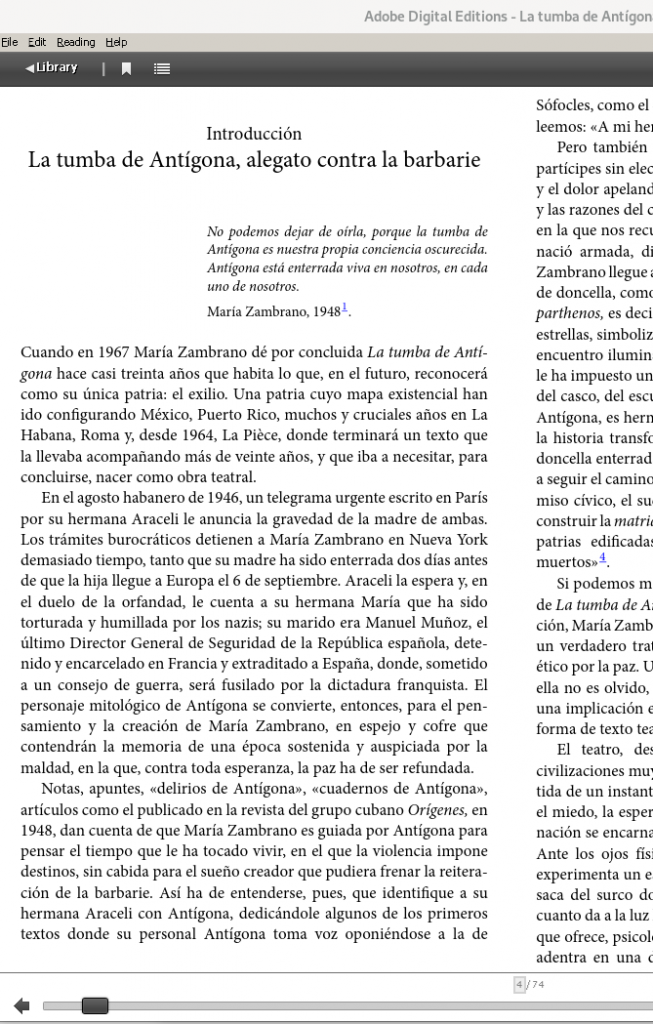
$ wine ADE_4.5_Installer.exeY aquí una captura de ADE funcionando con wine, una vez hemos descargado el libro prestado:

-

Suspender e Hibernar un Macbook pro con Debian Buster
Tengo un Macbook pro con Debian GNU/Linux en el cual estaba teniendo problemas al hibernarlo y suspenderlo.
El interfaz de red que tiene es:
03:00.0 Network controller: Broadcom Limited BCM4360 802.11ac Wireless Network Adapter (rev 03)
En este portátil he trasteado bastante reparticionando su disco duro, por lo que es probable que ello haya influido en modificar los identificadores de las particiones swap usadas al hibernar.
Al hibernarlo:
El arrancar de nuevo el ordenador era igual que si no lo hubiera hibernado antes.
La solución estaba en modificar el archivo /etc/initramfs-tools/conf.d/resume
y especificar correctamente el identificador UUID de la partición de swap a usar.Los identificadores pueden comprobarse en el directorio:
/dev/disk/by-uuid/
Ejemplo:
- Comprobar donde está la partición de espacio de intercambio (swap)
$ sudo fdisk -l
.
/dev/sda3 131602432 165154815 33552384 16G Linux swap
. - Comprobar cual esl UUID de esa partición.
$ ls -l /dev/disk/by-uuid/
.
lrwxrwxrwx 1 root root 10 Nov 25 14:39 db4290b0-56c2-499c-aa4a-8a4e932e9b23 -> ../../sda3
. - Actualizar /etc/initramfs-tools/conf.d/resume con el UUID correcto. RESUME=UUID=db4290b0-56c2-499c-aa4a-8a4e932e9b23
Fuente: https://lists.debian.org/debian-user/2017/07/msg01074.html
Al suspenderlo:
En este caso, el principal inconveniente que estaba teniendo era que al volver de la suspensión perdía las conexiones de redes, sea por cable ethernet o inalámbrica por wifi.
Esto me estaba obligando a reiniciar el network-manager, y con frecuencia varias veces seguidas tras volver de una suspensión.Tras jugar con ajustes de energía en los paneles de control, los archivos de interfaces, systemd, etc…
Al final, la solución estuvo en evitar conflictos entre varios gestores de red. En mi caso opté por eliminar el paquete wicd-daemon y dejar que network-manager se encargue de las conexiones.
- Comprobar donde está la partición de espacio de intercambio (swap)
-
Himalaya’s trekking on 2017 – From Dingbuche to Pangbuche
…. or google earth view. While stading at the top, a choba comes to this height, over six thousand meters height. It looks like the old tales where an animal come to deliver a message from the gods and go.
I have been so afraid during the ascension that I only want to come to safety. Luis goes down and wait on the rappel down line while I have to wait while talking to the australian guy that tells me that yesterday y climbed the Mera peak. X. and Coultin arrive. Xan sprawl on the floor and Karma helps me all the way down by changing the safeties. This is easier and faster than going up.
I think about all this crazyness that I have lived in the last hours and at the moment I think this stuff is not for me.
Going down takes all my strength and the plastic boots are rigid and do not help. Luis and Karm wait for me all the way down.
We reach the base camp where Sonam is getting my backpack. We celebrate with a coke that the cook gives me and I grab a snicker that Tomás offers, when we reach the camp.
We finally have lunch and decide to go down and descend the altitude all we can so we can sleep and regenerate better during the night. It is several hours walking until we reach Dingbuche.
I am happy.
-
Himalaya’s trekking on 2017 – Ascension to the Island Peak and going back to Dingbuche
We went to bed at 6pm to be ready to get up at midnight. I used an sleeping pill and ear plugs to avoid the snores of the colleague. The sleeping bag has forst on the outside. I get out early and X. gets mad at me because I did not leave the tent completely open.
We have breakfast and a procession of lights starts moving lead by Karma, and then Luis and Tomas and I join the other groups.
It is a difficult path upwards, full of rocks, and when I look up I only see lights near the rocks , all them ascending towards the stars. Tomás does not feel strong and goes back.
We cross paths where we need to grab ropes and we barely see where we put our feet, but the dark recedes, the sun comes and we reach the snow and the ice, so we start to set up our gear. Karma helps me with the crampons and the harness.
We find the first wall where we need to use the jumar, it is exhausting even if it is only 5 or 10 meters.
Then, it comes….The first pass above the abyss. It is over a several set of aluminium stairs tied to each other. My emotions are frozen so I am able to walk setting my cramponed feet to pass over the crevasse.
Just after passing this, in the distance, it appears a 100 meters wall of ice. I tell Luis that I am afraid and thinking of stopping here but he encourages me continue. We join a queque full of people climbing with crampons and jumar. I reach a point that I am uber thirsty, with so many people the queue takes hours and we need to get strength to keep our arm grabbing the jumar just standing there and trying to avoid to be taken down my the people belows me that draw so near that barely give me space. I get upset with the german below me, because it keeps pushing me to the left, even when I ask him several times to keep the distance.
Looking around I see the snow vertical world where the sherpas moves up and down without difficulty around us, like Spidermen.
At the top, we still have to walk without jumar towards teh very top, a 2 meter square platform. We receive the congratulations from the people there and the beginning I just crawl and sit on the floor, but soon I join Luis and we stand to take some photos. Everything is from eagle point of view.
-
Himalaya’s trekking on 2017 – From Chhukkung to Island Peak Base Camp
We walk through a path that seems taken from another planet, full of smashed rocks, like from a film of the Riddick chronicles, a desert.
We don’t cross or see other trekkers but we see the Island Peak on the distance and follow that direction.
Luis, Tomás. and I go first and soon we find Sonam and Coultin, the climbing guide that is helping X.
The base camp is arranged in several clusters of tents and ours seems to be in the last pocket.
We are received in a big yellow tent marked with the sign of Prestige Adventures.
It is tall enough to accomodate us standing up and it featur5es a central table surrounded by camping charis. We received a warm welcome and have our lunch there prepared by a cook in the nearest tent.
When it is getting dark I depart alone for a walk, and I am taken by the beautiful sights and sounds: The sky full of stars, and on the ground everything dark but for the globes of lights that come from the inhabited tents, the contour of the mountains arranged on the horizon…
The captivating sounds of a distant song played by an unknown musical instrument, it is a soothing melody in this distant land. -
Himalaya’s trekking on 2017 – From Ding Buche to Chhukkung
I slack on the bed while X. prepares his stuff. So without changing clothes I have the breakfast first, and then go to select the pieces that we won’t carry to Chhukkung.
Since the house is powered by solar energy, the powerbank is only charged to a half so the hostess only charge half the price.
We start the ascension even if it’s a smooth one with a steady pace. We are accompanied by the river and when looking back we get an impressive look at the valley and Dingbuche below.
Chhukkung seems to be the typical place here with full of lodges with english signs. Our lodge claims to be one of the highests.
Not so much to do during the evening. L. is having a hard digestion so I give him some almax.
I take a nap, meditate, and notice how attached I became to receive messages from my loved ones, so I spend some time writing letters and letting go of this thoughts.
-
Himalaya’s trekking on 2017 – From Gorak Shep, visiting the Everest Base Camp, to Ding Buche
On this day we went from Gorak Shep to the Everest Base Camp, then Lobuche for lunch and finally to DingBuche
The visit to the Everest Base Camp is iearly in the morning. I love the view of the glaciar.
On the way back we took our backbacks from the lodge. X. almost fell and harmed a bit his foot. However, he recovers very fast and we arrive to Lobuche to have lunch. I have time to lie down and sleep while waiting for a pizza.
At 2pm. we continue down, crossing many trekkers and we see the place with the many memorials for people that lost their lives at Everest.
It is a long trek, and listen to some music from the mp3 player, and we discover some estupas among the fog.
This lodge is awesome, so I have a shower and I feel in good mood and have a bit of sherpa stew.
